Tutorial
Pre-setup
[2]:
import os
import logging
import pandas
from datetime import datetime
from google.cloud import bigquery
from google.cloud import storage
from google_pandas_load import Loader
from google_pandas_load import LoaderQuickSetup
from google_pandas_load import LoadConfig
[3]:
project_id = 'dmp-y-tests'
dataset_id = 'tmp'
bucket_name = 'bucket_gpl'
# gs_dir_path_in_bucket is the path in
# the bucket of the directory that
# will contain the data in Storage.
gs_dir_path_in_bucket = 'gpl_dir/subdir'
local_dir_path = '/tmp/gpl_directory'
[4]:
if not os.path.isdir(local_dir_path):
    os.makedirs(local_dir_path)
Set up a loader
Throughout this document, we call loader an instance of google_pandas_load.Loader or of google_pandas_load.LoaderQuickSetup.
We emphasize that the second class is a daughter of the first one.
The next two sections will be devoted to the creation of both classes through their main parameters which are data locations.
the low-level way
To set up a loader the low-level way, use google_pandas_load.Loader.
In the following code cell, credentials are inferred from the environment. Further information about how to authenticate to Google Cloud Platform with the Google Cloud Client Libraries for Python can be found here.
[5]:
# the bq_client to execute the load jobs' cloud parts,
# which are the execution of queries, the extaction of BigQuery
# tables to Storage and the load of tables to BigQuery
# from Storage.
bq_client = bigquery.Client(
    project=project_id,
    credentials=None)

# the dataset_ref pointing to the dataset to store the data
# in BigQuery.
dataset_ref = bigquery.dataset.DatasetReference(
    project=project_id,
    dataset_id=dataset_id)

# the gs_client is used to instantiate a bucket.
gs_client = storage.Client(
    project=project_id,
    credentials=None)
# the bucket to store the data in Storage.
bucket = storage.bucket.Bucket(
    client=gs_client,
    name=bucket_name)

gpl = Loader(
    bq_client=bq_client,
    dataset_ref=dataset_ref,
    bucket=bucket,
    gs_dir_path_in_bucket=gs_dir_path_in_bucket,
    local_dir_path=local_dir_path)
In the setup above, the bq_client, the dataset_ref and the gs_client share the same project_id. Furthermore, the bq_client and the gs_client share the same credentials. However neither the project_id nor the credentials are required to be the same.
In order to be able to execute load jobs with all possible source and destination, the bq_client must have read and write access in both the dataset and the bucket.
If one wants to use directly the bucket’s root directory to store the data loaded in Storage, one can set the gs_dir_path_in_bucket parameter to None.
the quick way
To set up a loader quickly, use google_pandas_load.LoaderQuickSetup.
The code behind the instantiation is essentially the same as in the previous cell.
Contrary to the low-level way the bq_client, the dataset_ref and the gs_client share the same project_id. Moreover the bq_client and the gs_client share the same credentials.
[6]:
gpl_quick_setup = LoaderQuickSetup(
    project_id=project_id,
    dataset_id=dataset_id,
    bucket_name=bucket_name,
    gs_dir_path_in_bucket=gs_dir_path_in_bucket,
    credentials=None,
    local_dir_path=local_dir_path)
A simple download
[7]:
df = gpl.load(
    source='query',
    destination='dataframe',
    query='select 1 as x')

df
[7]:
| x | |
|---|---|
| 0 | 1 |
A simple upload
[8]:
gpl.load(
    source='dataframe',
    destination='bq',
    data_name='a0',
    dataframe=df)
This command has created the following table in BigQuery:
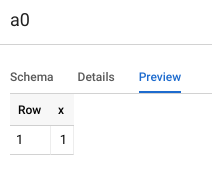
Its id in BigQuery is project_id:dataset_id.a0, where project_id is the dataset’s one.
Basic loading mechanism
source and destination
The source and destination parameters of google_pandas_load.Loader.load() take one of the following values:
‘query’,
‘bq’
‘gs’,
‘local’
‘dataframe’
Loading paths
The downloading path is ‘query’-> ‘bq’ -> ‘gs’ -> ‘local’ -> ‘dataframe’.
The uploading path goes in the opposite direction.
Load result in RAM
- If destination = ‘query’, the following BigQuery standard SQL query is returned :“select * from `project_id.dataset_id.data_name`”,where the project_id is the dataset’s one.
If destination = ‘dataframe’, a pandas dataframe is returned.
Otherwise, None is returned.
In general, data is moved, not copied!
Once the load job has been executed, the data usually does not exist anymore in the source and in any transitional locations.
However two exceptions exist:
When source = ‘dataframe’, the dataframe is not deleted in RAM.
When destination = ‘query’, the data is not deleted in BigQuery, so that it still exists somewhere. Indeed, in this case, the load job returns a simple query (see the previous section) which represents the data but does not contain it.
Use the delete_in_bq, delete_in_gs and delete_in_local parameters from google_pandas_load.Loader.load() to control the data deletion, during the execution of the load job.
In general, pre-existing data is deleted!
Before new data is moved to any location, the loader will usually delete any prior data bearing the same name to prevent any conflict.
There is one exception:
When destination = ‘bq’ and the write_disposition parameter from google_pandas_load.Loader.load() is set to ‘WRITE_APPEND’, new data is appended to pre-existing one with the same name in the dataset.
What is the data named data_name?
in BigQuery : the table in the dataset whose id is data_name.
in Storage : the blobs whose basename begins with data_name inside the bucket directory.
in local : the files whose basename begins with data_name inside the local folder.
This definition is motivated by the fact that BigQuery splits a big table in several blobs when extracting it to Storage.
More examples
from query to gs
[9]:
gpl.load(
    source='query',
    destination='gs',
    data_name='a0',
    query='select 5 as y')
from gs to local
[10]:
gpl.load(
    source='gs',
    destination='local',
    data_name='a0')
from local to dataframe
[11]:
df = gpl.load(
    source='local',
    destination='dataframe',
    data_name='a0')
from dataframe to gs
[12]:
gpl.load(
    source='dataframe',
    destination='gs',
    data_name='a0',
    dataframe=df)
from gs to query
[13]:
query = gpl.load(
    source='gs',
    destination='query',
    data_name='a0',
    bq_schema=[bigquery.SchemaField('y', 'INTEGER')])
[14]:
query
[14]:
'select * from `dmp-y-tests.tmp.a0`'
[15]:
bq_schema = LoadConfig.bq_schema_inferred_from_dataframe(df)
bq_schema
[15]:
[SchemaField('y', 'INTEGER', 'NULLABLE', None, ())]
List data
[16]:
query = """
select * from
(select 'Hello, ' as x from unnest(generate_array(1, 4000)))
cross join
(select 'World!' as y from unnest(generate_array(1, 4000)))
"""

gpl.load(
    source='query',
    destination='gs',
    data_name='a0',
    query=query)
To list this data, named a0, in Storage:
[17]:
gpl.list_blobs(data_name='a0')
[17]:
[<Blob: bucket_gpl, gpl_dir/subdir/a0-000000000000.csv.gz>,
 <Blob: bucket_gpl, gpl_dir/subdir/a0-000000000001.csv.gz>]
It is also possible to list the blob uris:
[18]:
gpl.list_blob_uris(data_name='a0')
[18]:
['gs://bucket_gpl/gpl_dir/subdir/a0-000000000000.csv.gz',
 'gs://bucket_gpl/gpl_dir/subdir/a0-000000000001.csv.gz']
The data was big enough for BigQuery to split it into several files in Storage.
Let us move this data into the local folder:
[19]:
gpl.load(
    source='gs',
    destination='local',
    data_name='a0')
To list this data, named a0, in the local folder :
[20]:
gpl.list_local_file_paths(data_name='a0')
[20]:
['/tmp/gpl_directory/a0-000000000001.csv.gz',
 '/tmp/gpl_directory/a0-000000000000.csv.gz']
To prevent BigQuery from splitting the data, set use_wildcard to False when creating the loader.
Check data existence
[21]:
print(gpl.exist_in_local(data_name='a1'))

gpl.load(
    source='query',
    destination='local',
    data_name='a1',
    query='select 2')

print(gpl.exist_in_local(data_name='a1'))
False
True
Delete data
delete parameters
Use the delete_in_bq, delete_in_gs and delete_in_local parameters to control data deletion in BigQuery, in Storage or in the local folder, during the execution of a load job.
[22]:
df = pandas.DataFrame(data={'x':[1]})

gpl.load(
    source='dataframe',
    destination='bq',
    data_name='a1',
    dataframe=df,
    delete_in_local=True,
    delete_in_gs=False)
Note that the default value of these three parameters is True.
[23]:
print(gpl.exist_in_local(data_name='a1'))
print(gpl.exist_in_gs(data_name='a1'))
print(gpl.exist_in_bq(data_name='a1'))
False
True
True
delete methods
[24]:
gpl.load(
    source='query',
    destination='gs',
    data_name='a1',
    query='select 2')

print(gpl.exist_in_gs(data_name='a1'))
gpl.delete_in_gs(data_name='a1')
print(gpl.exist_in_gs(data_name='a1'))
True
False
Cast data
cast data into pandas
[25]:
query = """
select 5 as x, 5 as y, 5 as z
"""
dtype = {
    'x': str,
    'y': float}

df = gpl.load(
    source='query',
    destination='dataframe',
    query=query,
    dtype=dtype)

df
[25]:
| x | y | z | |
|---|---|---|---|
| 0 | 5 | 5.0 | 5 |
[26]:
df.dtypes
[26]:
x     object
y    float64
z      int64
dtype: object
To cast a column into the datetime.datetime type, use the parse_dates parameter.
[27]:
query = """
select
cast('2012-11-14 14:32:30' as TIMESTAMP) as x,
'2013-11-14 14:32:30.100121' as y,
'2012-11-14' as z
"""

df = gpl.load(
    source='query',
    destination='dataframe',
    query=query,
    parse_dates=['x', 'y', 'z'])

df
[27]:
| x | y | z | |
|---|---|---|---|
| 0 | 2012-11-14 14:32:30 | 2013-11-14 14:32:30.100121 | 2012-11-14 |
[28]:
df.dtypes
[28]:
x    datetime64[ns]
y    datetime64[ns]
z    datetime64[ns]
dtype: object
cast data into BigQuery
[29]:
df = pandas.DataFrame(data={'x': [7, 8], 'y': ['a', 'b']})

gpl.load(
    source='dataframe',
    destination='gs',
    data_name='a0',
    dataframe=df)


bq_schema = [bigquery.SchemaField(name='x', field_type='FLOAT'),
             bigquery.SchemaField(name='y', field_type='STRING')]

gpl.load(
    source='gs',
    destination='bq',
    data_name='a0',
    bq_schema=bq_schema)
[30]:
table_ref = dataset_ref.table(table_id='a0')
table = bq_client.get_table(table_ref)
table.schema
[30]:
[SchemaField('x', 'FLOAT', 'NULLABLE', None, ()),
 SchemaField('y', 'STRING', 'NULLABLE', None, ())]
If source = ‘dataframe’, the bq_schema argument is not required. In BigQuery, a column is given its type according to the following rule:
if its name is listed in the date_cols parameter, its type in BigQuery should be DATE.
elif its name is listed in the timestamp_cols parameter, its type in BigQuery should be TIMESTAMP.
elif its pandas dtype is equal to numpy.bool, its type in BigQuery is BOOLEAN.
elif its pandas dtype has numpy.integer dtype as ancestor, its type in BigQuery is INTEGER.
elif its pandas dtype has numpy.floating dtype as ancestor, its type in BigQuery is FLOAT.
else its type in BigQuery is STRING.
[31]:
dt = datetime.strptime(
    '2003-11-14 14:32:30.100121',
    '%Y-%m-%d %H:%M:%S.%f')
df = pandas.DataFrame(
    data={
        'w': [8.0],
        'x': ['e'],
        'y': ['2018-01-01'],
        'z': [dt]})

gpl.load(
    source='dataframe',
    destination='bq',
    data_name='a0',
    dataframe=df,
    date_cols=['y'],
    timestamp_cols=['z'])
[32]:
table_ref = dataset_ref.table(table_id='a0')
table = bq_client.get_table(table_ref)
table.schema
[32]:
[SchemaField('w', 'FLOAT', 'NULLABLE', None, ()),
 SchemaField('x', 'STRING', 'NULLABLE', None, ()),
 SchemaField('y', 'DATE', 'NULLABLE', None, ()),
 SchemaField('z', 'TIMESTAMP', 'NULLABLE', None, ())]
Multi load
[33]:
config1 = LoadConfig(
    source='query',
    destination='dataframe',
    query='select 1 as x')


df = pandas.DataFrame(data={'x': [3]})
config2 = LoadConfig(
    source='dataframe',
    destination='local',
    data_name='a0',
    dataframe=df)

load_results = gpl.mload(configs=[config1, config2])
[34]:
load_results[0]
[34]:
| x | |
|---|---|
| 0 | 1 |
[35]:
print(load_results[1])
None
Monitoring
monitor a load job
[36]:
xload_result = gpl.xload(
    source='query',
    destination='dataframe',
    query='select 11 as x')
[37]:
xload_result.load_result
[37]:
| x | |
|---|---|
| 0 | 11 |
[38]:
print(xload_result.data_name)
print(xload_result.duration)
print(xload_result.durations)
print(xload_result.query_cost)
20190411204308_743495_rand2025
2
Namespace(bq_to_gs=1, bq_to_query=None, dataframe_to_local=None, gs_to_bq=None, gs_to_local=0, local_to_dataframe=0, local_to_gs=None, query_to_bq=1)
0.0
monitor a multi load job
[39]:
config1 = LoadConfig(
    source='query',
    destination='dataframe',
    query='select 1 as x')


df = pandas.DataFrame(data={'x': [3]})
config2 = LoadConfig(
    source='dataframe',
    destination='local',
    data_name='a0',
    dataframe=df)

xmload_result = gpl.xmload(configs=[config1, config2])
[40]:
xmload_result.load_results
[40]:
[   x
 0  1, None]
[41]:
print(xmload_result.data_names)
print(xmload_result.duration)
print(xmload_result.durations)
print(xmload_result.query_cost)
print(xmload_result.query_costs)
['20190411204312_709635_rand9239', 'a0']
2
Namespace(bq_to_gs=1, bq_to_query=None, dataframe_to_local=0, gs_to_bq=None, gs_to_local=0, local_to_dataframe=0, local_to_gs=None, query_to_bq=1)
0.0
[0.0, None]
Logging
The logger creating google_pandas_load.Loader’s log records is named Loader and is controlled, as usual, by the application code.
[42]:
import logging
logger = logging.getLogger('Loader')
logger.setLevel(level=logging.DEBUG)
ch = logging.StreamHandler()
formatter = logging.Formatter(fmt='%(name)s - %(levelname)s - %(message)s')
ch.setFormatter(fmt=formatter)
logger.addHandler(hdlr=ch)
[43]:
df = gpl.load(
    source='query',
    destination='dataframe',
    query='select 1 as x')
Loader - DEBUG - Starting query to bq...
Loader - DEBUG - Ended query to bq [1s, 0.0$]
Loader - DEBUG - Starting bq to gs...
Loader - DEBUG - Ended bq to gs [1s]
Loader - DEBUG - Starting gs to local...
Loader - DEBUG - Ended gs to local [0s]
Loader - DEBUG - Starting local to dataframe...
Loader - DEBUG - Ended local to dataframe [0s]
The logger creating google_pandas_load.LoaderQuickSetup’s log records is named LoaderQuickSetup. Contrary to the logger Loader, it already has a built-in console handler. Therefore, without any logging set up, logging records are displayed in the console. This is convenient when working with notebook.
[44]:
df = gpl_quick_setup.load(
    source='query',
    destination='dataframe',
    query='select 1 as x')
2019-04-11 20:43:20,808 - LoaderQuickSetup - DEBUG - Starting query to bq...
2019-04-11 20:43:22,470 - LoaderQuickSetup - DEBUG - Ended query to bq [1s, 0.0$]
2019-04-11 20:43:22,472 - LoaderQuickSetup - DEBUG - Starting bq to gs...
2019-04-11 20:43:24,578 - LoaderQuickSetup - DEBUG - Ended bq to gs [2s]
2019-04-11 20:43:24,580 - LoaderQuickSetup - DEBUG - Starting gs to local...
2019-04-11 20:43:25,253 - LoaderQuickSetup - DEBUG - Ended gs to local [0s]
2019-04-11 20:43:25,255 - LoaderQuickSetup - DEBUG - Starting local to dataframe...
2019-04-11 20:43:25,264 - LoaderQuickSetup - DEBUG - Ended local to dataframe [0s]
In order to avoid duplicate log records in the console, the LoaderQuickSetup logger is by default set to not propagate its log records to its logger ancestors.
Both google_pandas_load.Loader and google_pandas_load.LoaderQuickSetup have a logger parmater. The default values are respectively the Loader logger and the LoaderQuickSetup logger. The parameters can, in both cases, be replaced by another logger.
